How I Give Codex a Screen Recording — A Real Narrate Example
2026-10-23
How do I give Codex a screen recording?
I use ThinkRun to turn my recording into context Codex can read: a transcript, screenshots and timestamps. I review that content, share its JSON link, and ask Codex to inspect it alongside my project's code. The agent needs tools that can retrieve the shared content and open the images. This is not a raw video upload to Codex.
Create your first recording with ThinkRun.
Here's a real example of that process, from an interaction I wanted to improve in my own app.
Why I needed this while building Narrate
I'm building Narrate, an iPhone app for telling the story behind your photos. You choose photos, add your voice, and share a link with someone.
I want people to focus on the memory they're sharing. Choosing photos and putting them in order should feel natural. If the controls are awkward, that simple task gets in the way of telling the story.
In this case, the functionality was there: I could select photos and reorder them. The usability still needed work. That distinction is hard to explain to a coding agent with a short prompt.
I used ThinkRun to show what I was doing and talk through what needed to change. Then I gave Codex the recording link and wrote: “here’s the feedback.” This is how that handoff helped turn a frustrating interaction into the updated photo tray.
1. What I showed the agent
Narrate's selected-photo tray has several jobs in a small space. It shows which photos I've picked, their order, and a control for removing each one. I also need to be able to drag a photo to a new position.
A screenshot can show the spacing or the size of a button. What I find harder to explain is the sequence: where I start a drag, how the tray responds, and whether the screen stays where I expect it to.
In the original recording, I explain that dragging only seems to work from “a very specific and small area.” Sometimes the entire screen moves when I try to drag a photo. I ask for more breathing room between images, a larger drag area, the × farther out, and an outline that makes the dragged photo clear.
That's where I use a recording. I can show the friction and explain the change I want while it's happening.
My original feedback: I show the small drag target and explain the changes I want.
2. What Codex understood
I shared the ThinkRun JSON link in the Codex conversation. That gave it a way to read the recording's transcript and inspect screenshots with timestamps.
For this kind of handoff, the steps are:
- Record the interaction. Show what happens and explain what you want to change. For this iPhone interaction, I used an existing phone recording.
- Review the processed recording in ThinkRun. Check the video, transcript and screenshots, plus any logs you choose to include. Remove private content before sharing.
- Create a share and copy its JSON or Markdown link. Those formats give the agent text and links to the screenshots. In this example, I used JSON.
- Give Codex the link and the task. Ask it to read the feedback, inspect the screenshots, and investigate the relevant project code. If it cannot retrieve the content, resolve that before asking it to make changes.
My short message worked because the recording carried the explanation. I wasn't expecting Codex to infer the whole task from the words “here’s the feedback.”
In its response, Codex described an issue beyond the remove button: a reorder attempt could also pull the screen toward the previous view. That was the agent's diagnosis from the earlier recording. It then investigated both the tray and the navigation gesture.
The response outlined several changes:
- Give the thumbnails more room.
- Move the remove control toward the outer corner.
- Make the dragged photo's outline clear.
- Keep tray gestures from pulling the screen back.
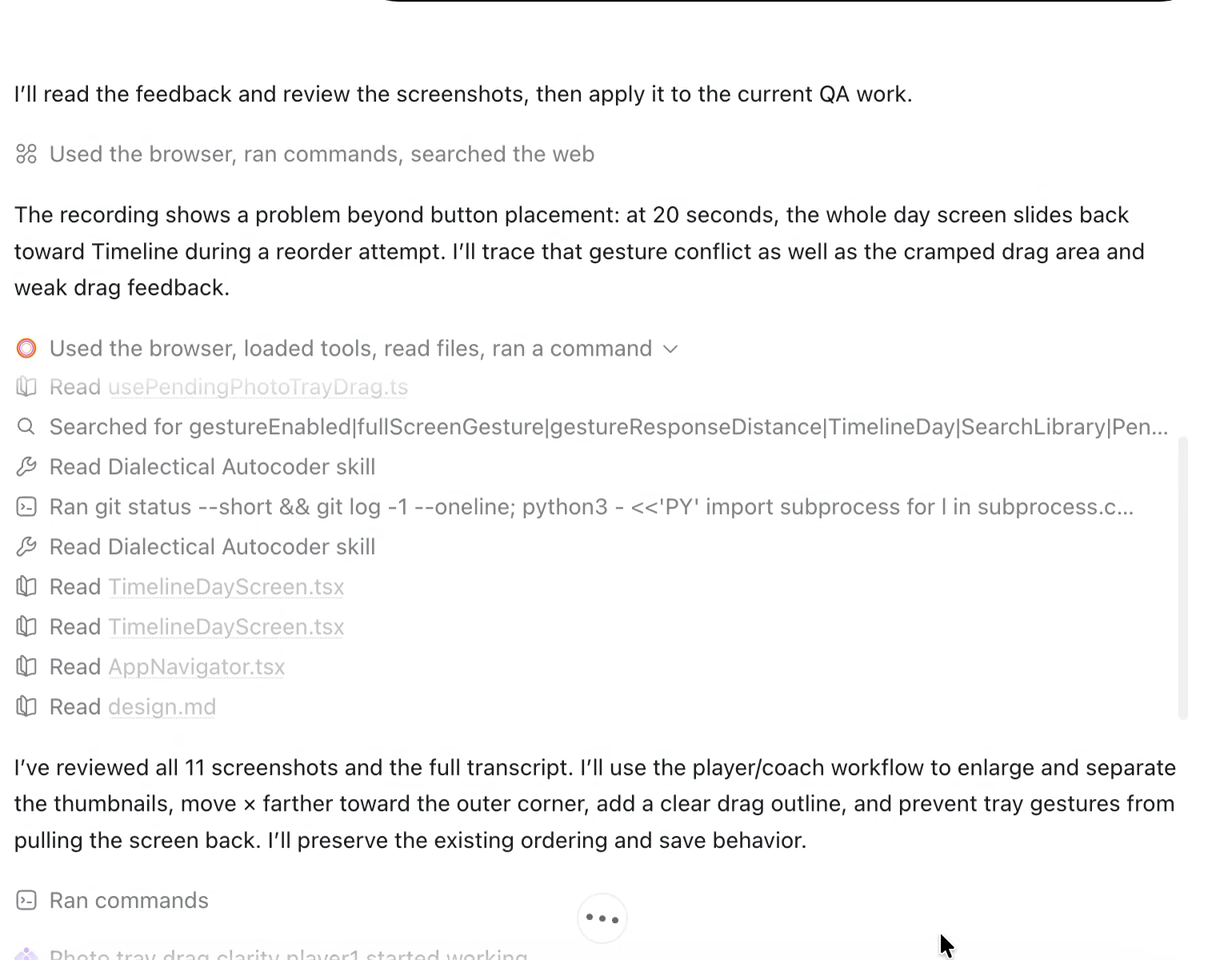
Codex turns the recording into specific changes to investigate. This is its interpretation, not a test result.
The recording helped me communicate those details together: the space around the photos, the controls near my finger, and what happened during a drag. Codex could turn that context into specific changes.
The recording walkthrough covers preparing this kind of handoff. The sharing docs explain the replay page, JSON and Markdown links.
3. What changed
The updated phone recording shows the result. I move the selected photos between positions, the number badges change, and all four photos stay selected. The app stays on the Search library screen during those drags.
The updated photo-ordering interaction in Narrate.
My response in the project conversation was: “yes it works,” with one more request: a little more space between the selected photos and the “Narrate these” button. Codex added more room below the photo tray.
That gets back to the experience I wanted: arranging the photos in the order I want to tell the story. Showing the interaction and talking through it gave me a way to explain the details behind “this feels awkward.”
Show your agent what needs to change
Record your screen and talk through the problem. ThinkRun gives your agent a transcript, screenshots and timestamps to work from.
Create a ThinkRun account to get started, then record from your dashboard. You can also upload a video you already have.
A prompt I can use for the next change
My process is small enough to repeat:
- Show one interaction and talk through what I expect.
- Review the recording and its screenshots and transcript.
- Give the agent the recording link and ask it to investigate.
- Use the recording as a shared reference for the changes.
For a new task, I'd use a more explicit prompt than the short message in this example:
Read this ThinkRun recording and inspect the linked screenshots: [paste JSON link here]. I'm explaining how I want this interaction to work. Summarize the changes I'm asking for, then use this project's code to make them. If any part of the feedback is unclear or inaccessible, tell me.
This is how I give my agent context while building Narrate. I show the interaction and explain what I mean while it's happening. That helps me hand off the subtle parts of usability that are hard to describe in a prompt.
Ready to show your agent what you mean? Create your first recording with ThinkRun.
FAQ
Can I give Codex a screen recording?
You can share a ThinkRun JSON or Markdown link containing the recording’s transcript, screenshots and timestamps. Codex needs tools that can retrieve that content and inspect the images. This workflow does not require it to accept a raw video upload.
Can I use an iPhone recording?
You can upload an existing video through ThinkRun's upload flow, then review the processed recording before sharing it. The interaction in this example is in an iPhone app.
How do I share a recording with my agent?
Open the processed recording in ThinkRun, review what it includes, and click Share. Choose which logs to include, then copy the JSON or Markdown link for your agent. The replay-page link is useful when you want another person to watch it.
Do I need the browser extension?
No. You can record from the ThinkRun dashboard or upload a video you already have. The browser extension is another way to start a recording.
Would this also work with Claude Code?
The same kind of handoff can work when your Claude Code setup can retrieve the shared text and inspect the linked images. This particular example shows Codex. The Claude Code recording guide walks through preparing and sharing that evidence.
When is a screenshot enough?
I use screenshots for things that can be seen in one state, such as spacing or a misplaced control. When I need to explain a gesture or a sequence of changes, I find it easier to record the steps and talk through them.
What should I say while recording?
Describe what you're trying to do, what feels awkward, and how you want it to behave. Show the action as you explain it. For a gesture, include where you start and where you expect the item to end up.
What should I remove before sharing?
Check all exposed layers: video, transcript, screenshots and optional logs. Remove private photos, account details, unrelated conversations, keys and other sensitive information before creating a public share.