Playwright CLI vs MCP: Which Is Cheaper? We Tested Both
2026-11-05
The 5½-minute video covers all 285 tests, including Playwright’s own docs task and agents that write a script once. Below is the first round in detail.
Watch on YouTubeIn our test, Playwright CLI was not 4x cheaper than Playwright MCP on any of three models, and which tool used fewer tokens depended on the model. On Claude Sonnet 5.5 and GPT-6 Luna, the CLI sent 15–37% fewer tokens. On GPT-6.1 Sol, it sent about the same on one task and 22–58% more on the other two. Fewer tokens didn't always mean a lower bill. This covers local test pages and one agent per vendor, so it measures these setups rather than ranking the tools everywhere.
The data, every prompt and the scripts behind each number are in the benchmark folder on GitHub.
| Median tokens sent | Claude Sonnet 5.5: MCP / CLI | GPT-6 Luna: MCP / CLI | GPT-6.1 Sol: MCP / CLI |
|---|---|---|---|
| 1 item, 20 products | 159,752 / 123,153 | 239,553 / 185,455 | 118,010 / 143,587 |
| 1 item, 400 products | 130,005 / 104,251 | 328,686 / 206,892 | 151,279 / 148,751 |
| 8 items, 400 products | 149,575 / 124,329 | 308,943 / 261,915 | 179,944 / 283,692 |
| CLI vs MCP | 17–23% fewer | 15–37% fewer | about equal to 58% more |
| Runs passed: MCP / CLI | 15/15 / 13/15 | 15/15 / 15/15 | 15/15 / 15/15 |
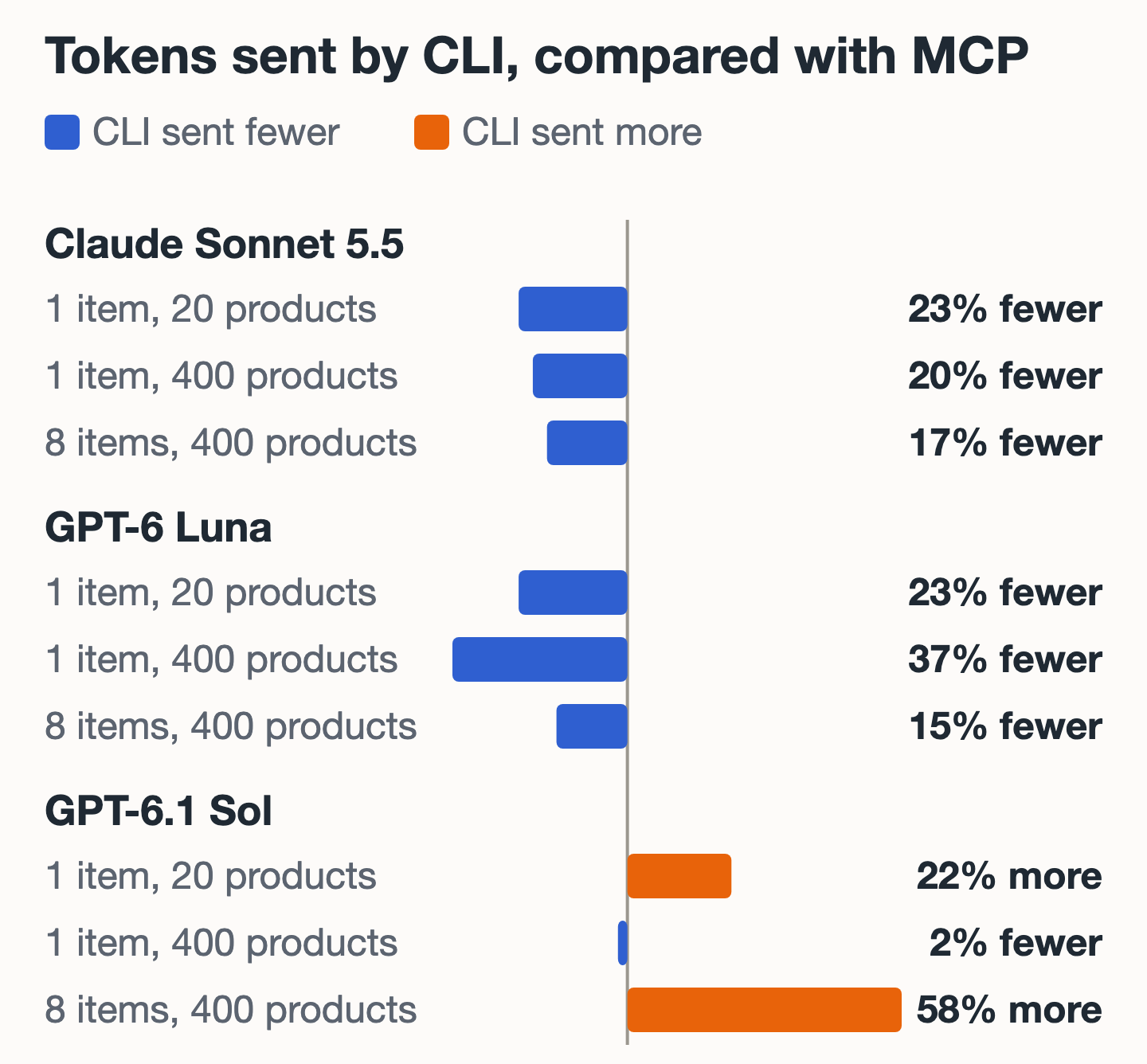
"Tokens sent" adds up the input for every model request in a run, including cached input. The medians include failed runs. Don't compare across vendors: each agent has its own system prompt and tools, so these numbers only compare CLI with MCP on one model.
| Median cost per run | Claude Sonnet 5.5: MCP / CLI | GPT-6 Luna: MCP / CLI | GPT-6.1 Sol: MCP / CLI |
|---|---|---|---|
| 1 item, 20 products | $0.082 / $0.100 | $0.0062 / $0.0048 | $0.063 / $0.077 |
| 1 item, 400 products | $0.056 / $0.078 | $0.0080 / $0.0056 | $0.070 / $0.063 |
| 8 items, 400 products | $0.093 / $0.089 | $0.0087 / $0.0071 | $0.068 / $0.105 |
Claude costs are what Claude Code reported at list price. Codex costs are our estimates from token counts and OpenAI's list prices on November 5, 2026, assuming cached tokens are counted within input and reasoning tokens within output.
Should you use Playwright CLI or MCP?
Choose by how your agent runs, then measure your own flow:
- Your agent has no shell, or you restrict it heavily: use Playwright MCP.
- Your agent has a normal shell and you want page data kept in files: use Playwright CLI.
- Your flow is long and repetitive: either can batch it. Make the agent check the result afterward, because a bad script can change many things at once.
- Cost is your only reason for switching: run your own task through both first, on the model you actually use. Switching would have saved money on GPT-6 Luna, and cost more on Claude's two 1-item tasks and on two of GPT-6.1 Sol's three.
To see what a task costs, run it with --output-format json in Claude Code, or use codex exec --json and read the token counts in its turn.completed event:
claude -p "<your task>" --output-format json | jq '{cost: .total_cost_usd, usage: .usage}'
What is the difference between Playwright CLI and Playwright MCP?
Both let a coding agent drive a browser with Playwright. They differ in how the agent reaches it:
- Playwright MCP gives the agent browser actions as MCP tools. The results come back through those tool calls.
- Playwright CLI gives the agent shell commands such as
playwright-cli click. It saves page snapshots to files, so the agent can search them instead of reading everything.
This is the agent tool playwright-cli, not the npx playwright test command that runs your test suite.
To add Playwright MCP to Claude Code:
claude mcp add playwright npx @playwright/mcp@latest
To install Playwright CLI and its skill:
npm install -g @playwright/cli@latest
playwright-cli install --skills
What Playwright CLI and Playwright MCP each give up
Playwright CLI needs a shell. That's wider access than a fixed set of browser tools. In our Codex setup, the CLI side ran with full shell access because Chrome wouldn't start inside Codex's macOS sandbox, while the MCP side had no shell. Both failed Claude runs also involved shell scripting the agent wrote itself.
Playwright MCP adds more to the model's context. Playwright's README says the CLI avoids "large tool schemas and verbose accessibility trees". In our test, the CLI sent fewer tokens on two models but not the third. MCP doesn't rule out scripting either: all five Claude MCP runs on the 8-item task used browser_run_code_unsafe.
The README calls the CLI the best fit for coding agents, and says MCP remains relevant for "exploratory automation, self-healing tests, or long-running autonomous workflows". We didn't test those. GitHub Agentic Workflows made the CLI its only built-in Playwright option, citing token cost and simpler upkeep.
Why we tested Playwright CLI token use
Several pages repeat a figure of about 114,000 tokens for MCP and 27,000 for the CLI. Most of the ones we read gave no method. TestDino reports a similar 115,000 and 25,000 from its own run of a 30-action flow. Checkly ran a shop task three times and found "no big difference".
Playwright's own README says "CLI invocations are more token-efficient", without giving numbers. We couldn't find a test that published its prompts, versions and per-run data, so we built one.
We make ThinkRun, a screen recording tool for coding agents. Neither of these tools is ours.
Playwright CLI vs MCP results: tokens, cost, time and failures
Token use on each model
No model showed the roughly 4x gap in the repeated figures. The largest gap in the CLI's favor was 37% fewer tokens, on GPT-6 Luna's 1-item, 400-product task. On Claude, final context never came close to 114,000 tokens, with medians between 16,750 and 25,545 on both tools.
Why GPT-6.1 Sol was the exception
On the 8-item task, its MCP runs mostly batched the work into a script, while its CLI runs leaned more on individual clicks and fills, and sent 58% more tokens. Those CLI runs also varied the most, from 148,399 to 366,312 tokens.
Why fewer tokens didn't always cost less
On Claude, fewer tokens didn't mean a lower bill on the two 1-item tasks. The official skill added about 6,000 tokens when it loaded in every CLI run, and the runs we broke down wrote more tokens to the prompt cache. Cache writes cost more than cache reads, so that's the likely reason, though we didn't isolate it.
Single runs varied. On Claude, MCP runs on the 1-item, 400-product task ranged from $0.042 to $0.087, and CLI runs on the 8-item task from $0.076 to $0.120.
Time and page size
We wouldn't call a speed winner. The ranges overlapped on every task and model, and five runs can't separate them.
The effect of page size depended on the model. On Claude, the 400-product task used no more tokens than the 20-product task on either tool. Agents searched or queried the page rather than reading it all, using browser_find and browser_evaluate on MCP, and head and eval on the CLI. Tokens did rise on the GPT models: 37% on MCP and 12% on the CLI with GPT-6 Luna, and 28% on MCP and 4% on the CLI with GPT-6.1 Sol.
Failed runs
All 60 Codex runs in the final, browser-only round passed (the discarded first attempt is described below). On Claude, two 8-item CLI runs left seven of the eight items at quantity 0, with identical carts. In one, the agent found a quoting bug in its own shell script. In the other, it said it hadn't found the cause, although its loop used set -- $p, which doesn't split words in zsh, the shell on our test machine. In both, the agent reported the failure instead of returning a wrong answer. Our test page accepted a quantity of 0, which a stricter site might have rejected.
Why Playwright MCP batching changed the 8-item task
Agents often avoided 30 separate steps on the 8-item task. On Claude, all five MCP runs used browser_run_code_unsafe to batch work in one script, and at least four CLI runs used a shell loop or script.
That means the 8-item task didn't test a step-by-step session, where a large gap could still appear. If your agent has to inspect each page before deciding what to do next, your numbers may look different.
How we ran the Playwright CLI vs MCP test
Every run used a fresh shop page, browser session and temporary folder, on a headless Chrome.
- Agents: Claude Code 2.1.318 with
claude -p, and Codex CLI 0.165.0 withcodex exec - Models: Claude Sonnet 5.5, GPT-6 Luna and GPT-6.1 Sol, all at medium effort
- Tools:
@playwright/mcp0.0.84, and@playwright/cli0.1.23 with its official skill - Runs: five per tool per task on each model, for 90 in the comparison
- Pass rule: the agent's answer had to match the expected items and total, and the server had to record the right number of add-to-cart requests
- Codex setup: the MCP side had no shell, and the CLI side had full shell access, because Chrome wouldn't start inside Codex's macOS sandbox. On the Codex runs, a pass also required every request to come from the browser
The two 1-item tasks used the same prompt, with 20 and 400 products on the home page:
Open <url> in the browser. Search for "liquid". Open the first result. Set the quantity to 2 and add it to the cart. Open the cart and check the total. Then reply with only this JSON: {"items": [{"product": "<product name>", "quantity": <quantity>}], "total": "<cart total>"}
The 8-item task repeated that flow on the 400-product page, with the same reply format:
Open <url> in the browser. For each item below, go back to the home page, use the search box to search for its term, open the first result, set the quantity and add it to the cart, in this order: "Lantern" quantity 1, "Backpack" quantity 2, "Kettle" quantity 1, "Notebook" quantity 3, "Speaker" quantity 1, "Thermos" quantity 2, "Headset" quantity 1, "Keyboard" quantity 2. Add each item exactly once. Then open the cart and check the total.
The result files call these tasks simple, dense and long.
Our Playwright CLI test setup mistakes
Our first Claude CLI batch used a shell allow-list that blocked loops and scripts, while MCP could still batch through its own tool. That wasn't a fair comparison, so we re-ran all 15 CLI runs with normal shell access. The table above uses the re-run. It wasn't interleaved with the MCP runs, because those had already finished.
The first batch is still useful. With scripting blocked, the 8-item CLI task took a median of 90 seconds and cost $0.159, with 16 denied commands across the five runs. It succeeded 5 out of 5 times, compared with 3 out of 5 once scripts were allowed. If you lock down your agent's shell, test the cost before assuming the CLI is the cheaper option.
Our first Codex CLI attempt couldn't find playwright-cli because of a PATH bug in our runner, and one agent placed its order with curl instead of the browser, which our scoring wrongly counted as a pass. We discarded those runs, fixed both problems, and required browser-only traffic. We then checked all 30 Claude CLI runs: only one used curl, for read-only debugging in a run already counted as failed.
What this Playwright test can't tell you
- It used three models, two agents and one kind of task.
- Results for these models will go stale as models and tools change, so check the test date: November 5, 2026.
- Our pages are local and simple HTML, unlike many production sites.
- Tools change quickly, so older figures may have been right for older versions. We can't say other tests were wrong, only that we couldn't reproduce their gap.
- Five runs per task is enough to see large gaps, not small ones.
- The Claude CLI re-run and the stricter Codex scoring differ slightly from the rest of the test, as described above.
Playwright CLI vs MCP test data
You can check our work or run it yourself. Everything is in the benchmark folder on GitHub, and its README maps every number here to the script that recomputes it:
- Results: MCP and first CLI batch
- Results: CLI re-run
- Results: GPT-6 Luna and GPT-6.1 Sol
- Claude runner, Codex runner and its settings helper, and the test shop page
- Analysis scripts: Claude, Codex and Codex cost estimate
- Every prompt, verbatim, and instructions for repeating the test
- To run it on your own agent and model, use the browser-tool-benchmark skill
We later extended this test to 285 runs, adding MCP with a shell, Playwright's own docs demo, step-by-step prompting, scripts written once and rerun, and agent-browser. The video at the top of this post covers those results; see also ThinkRun's analysis of the video.
If you're choosing a browser tool more broadly, see our guides to Playwright MCP alternatives and Chrome DevTools MCP alternatives.
Frequently asked questions
Is Playwright CLI cheaper than Playwright MCP?
It depends on the model. In our test, it cost less on all three tasks with GPT-6 Luna. It cost more on the two 1-item tasks with Claude Sonnet 5.5 and about 5% less on the 8-item task. With GPT-6.1 Sol, it cost more on two tasks and about 9% less on one.
Does Playwright MCP use more tokens than Playwright CLI?
Not always. MCP sent more tokens with Claude Sonnet 5.5 and GPT-6 Luna, by a smaller margin than often claimed. With GPT-6.1 Sol, the two were about equal on one task, and the CLI sent more on the other two.
Do I need the Playwright CLI skill?
Playwright's README documents how to install it, and we used it in every CLI run. It adds about 6,000 tokens when it loads. We didn't test the CLI without it.
Which is more reliable, Playwright CLI or MCP?
MCP passed all 45 of its runs and the CLI 43 of 45. Both CLI failures were on Claude's 8-item task, and at least one came from a bug in a script the agent wrote. All 60 Codex runs in the final round passed, after we discarded a first attempt with a runner bug. That sample is too small to call either tool more reliable in general.