5 Loom alternatives for developers and AI coding agents in 2026
2026-07-29
Loom is no longer just a way to send a video instead of scheduling a meeting.
Its new Video Prompts mode records your voice, keyframes, clicks, hovers, and visited links, then turns them into a structured Action Plan for an AI agent. You can copy that plan into an agent such as Claude or, with the right Atlassian account, create Jira work items for an agent to execute.
That changes what a useful “Loom alternative” needs to answer. The question is no longer only:
Which tool records and shares my screen?
It is also:
What does the recording become, and who needs to act on it?
A teammate can watch a five-minute video. A coding agent needs concrete, well-localized evidence it can inspect without guessing. A QA team needs console and network data. A client may need a feedback form, while an operations team needs a reusable procedure rather than a video at all.
There is no single best Loom alternative for all of those jobs. Here is the short version.
The best Loom alternatives at a glance
If you want the fastest answer:
- Choose ThinkRun when the evidence must move directly into a coding-agent conversation as Markdown or JSON.
- Keep Loom when your team already communicates in Loom and executes work through Jira.
- Choose Jam for a focused browser-bug intake system with mature MCP access.
- Choose Cap for an open-source, self-hostable screen recorder.
- Choose Marker.io for client website feedback, QA, and UAT.
- Choose Scribe when the lasting output should be an SOP rather than a video.
| Tool | Best for | What the agent receives | Main decision |
|---|---|---|---|
| Loom | Async communication and Jira-centered agent tasks | Action Plan or Jira work backed by transcript, keyframes, interactions, and links | Managed video workspace; agent and bug modes are specialized paid Chrome-extension workflows |
| ThinkRun | Portable evidence for coding agents and developers | Replayable timeline plus Markdown or JSON with screen, clicks, console, and network evidence | Works outside one tracker or agent and supports review before sharing; more developer-focused than a general video library |
| Jam | Developer browser-bug reports | MCP access to logs, requests, events, transcript, frames, and video analysis | Mature bug-intake workflow; not designed for polished company communication |
| Cap | Open-source, self-hostable screen recording | Transcript, summary, title, and chapters on Cap Pro | Strong ownership and storage control; does not center browser diagnostics |
| Marker.io | Website feedback, QA, UAT, and client reporting | Structured issue with annotations, metadata, and session replay on the relevant plan | Strong guest intake and issue sync; less useful as a general recorder |
| Scribe | SOPs and repeatable process documentation | Editable step-by-step guide with screenshots and instructions | Produces lasting documentation, not a narrated video or runtime bug artifact |
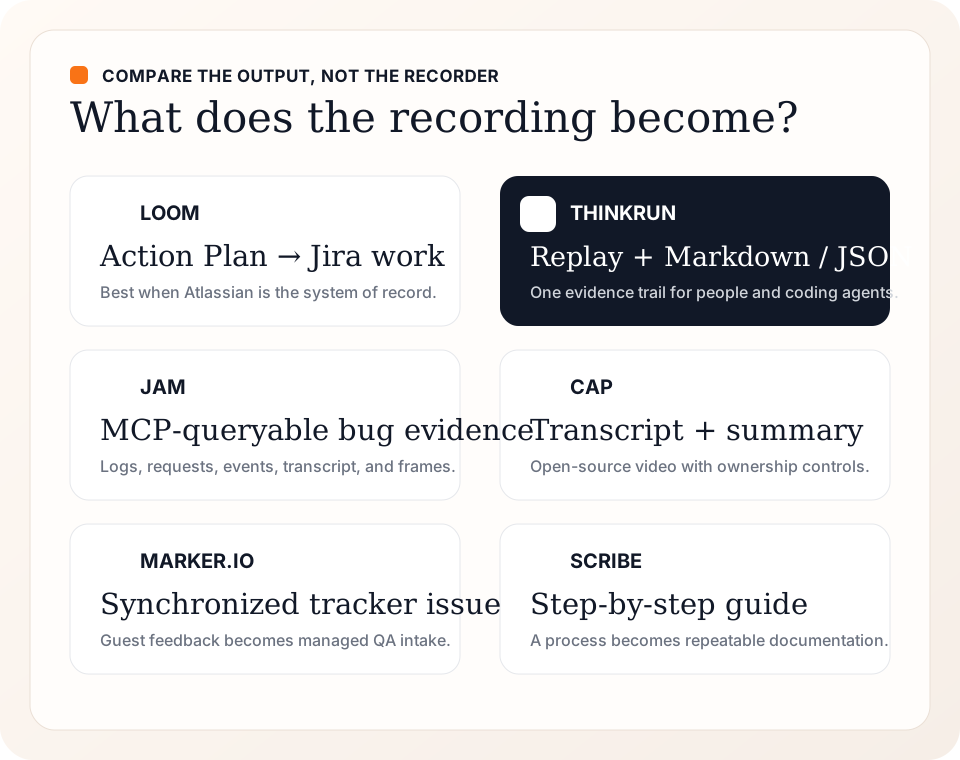
The meaningful difference is the object that survives after recording: a work item, portable evidence, a bug artifact, a transcript, a managed issue, or a procedure.
First: Loom may already be the right answer
The video that prompted this comparison shows a strong workflow:
- Start a Video Prompt from the Loom Chrome extension.
- Talk through a requested interface change while clicking and hovering over the relevant parts of a site and a design reference.
- Review the generated Action Plan.
- Turn an action into a Jira work item, where an agent can implement it.
The demo is short, clear, and materially better than asking an agent to infer a product change from a raw screen recording. Loom's Action Plan breaks the request into discrete tasks and attaches the spoken instruction, visual reference, and timestamp.
Loom has also closed an older gap for developer bug reports. Its separate Bug Report mode records device information, console messages, and network-request metadata alongside the video. Viewers can use that context to create Jira or Linear issues. Loom notes that network response data is still under development.
Keep Loom if your team already uses it for async communication, wants a managed video library, and works heavily in Jira. Video Prompts are currently an open beta on Business + AI and Enterprise plans. The Jira creation flow also requires an Atlassian-managed account with an active Jira subscription. Check Loom's current checkout for pricing because Atlassian is still transitioning Loom accounts, roles, and billing.
The important limitation is not that Loom “only records video.” That is no longer true. It is that Loom remains a communication platform first, with agent prompting and developer context added as specialized recording modes.
Output: a watchable Loom plus an AI Action Plan that can be copied into an agent or converted into Jira work.
Best for: teams that already use video for async communication and manage agent work in Jira.
Where it wins: Loom is the most natural choice here for polished, organization-wide video communication. Where it gives ground: the agent-prompt and bug-report workflows are specialized Chrome-extension modes rather than the default shape of every recording.
Verdict: keep Loom when communication is the primary job and Atlassian is already the system of record.
1. ThinkRun: best when the recording must travel with the agent
ThinkRun is built around a different reader. The primary output is not just a video someone can watch; it is a time-synced record an AI coding agent can inspect.
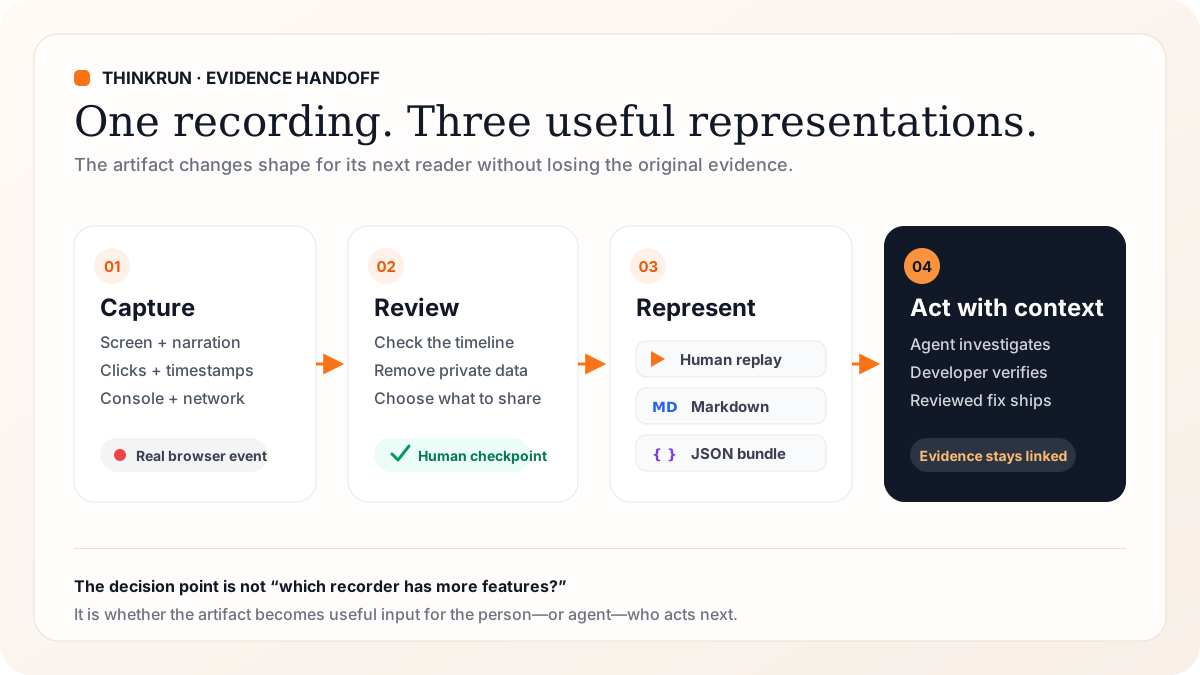
Output: one replayable timeline with Markdown and JSON representations that can be attached directly to a coding-agent conversation.
A browser recording can include:
- screen and voice
- clicks and page events
- console messages
- network requests
- comments pinned to an element and moment
The same recording remains useful to a person as a replayable link, but it can also be copied as Markdown or JSON and handed to Claude Code, Codex, Cursor, Cline, Windsurf, or another agent. That portability matters when Jira is not the center of the development workflow or when the receiver wants the evidence inside an existing coding session.
This 75-second example shows the simplest version of that handoff: a person points at a visual design, narrates the changes, and lets ThinkRun preserve the context. The account email has been removed from this copy; the narration and capture are otherwise unchanged.
The same sanitized share exposes Markdown and JSON with the transcript, screenshots, direct observations, and suggested changes that an agent can inspect without watching the recording.
ThinkRun also accepts existing video uploads, including phone recordings, and has a local mode in which recordings do not leave the machine unless the user shares them. Separately, its browser-control workflow can let an agent work in an explicitly attached tab in the Chrome profile you are already signed into. That explicit tab-attachment model is designed to keep the human in control of which live browser surface the agent can use.
Choose ThinkRun when:
- a bug happened in a real, logged-in browser and may not reproduce on demand;
- a product manager wants to point at a change instead of writing a detailed implementation prompt;
- the team wants one artifact that both a developer and an agent can inspect;
- the handoff needs to work outside one issue tracker or agent vendor;
- local capture or review-before-sharing is important.
The local recorder is free to use, while hosted analysis, share links, and cloud browser work use credits. Because the hosted plans are still evolving, check the current ThinkRun pricing page instead of relying on a price quoted in a comparison article.
Where it wins: the evidence is portable across issue trackers and agent vendors, and local recording supports review before anything is shared. Where Loom wins: company updates, sales videos, and a managed video library are more natural Loom workflows.
Verdict: choose ThinkRun when the recording is evidence for implementation, not merely a message to watch.
What that handoff looks like on a real bug
We also used ThinkRun on a production email-verification failure: the link in a real inbox still pointed to an old domain after a rebrand. The recording preserved the click, failed navigation, narration, and timestamps, helping the agent localize the problem before a human reviewed the diagnosis. The full debugging case study follows that evidence through diagnosis, implementation, and production verification.
The useful part was not an automatic “fix this” button. The evidence localized the failure to a dead verification domain, so the agent could investigate the right configuration instead of guessing from “the email link is broken.” A human still reviewed the diagnosis and the proposed change.
That older source recording includes a demo email address and a visible local username, so this article neither links nor embeds it. The sanitized design-feedback recording earlier in this section demonstrates the capture and agent-readable outputs without increasing the exposure of those details.
If this is the workflow you need, try ThinkRun on one real browser bug and evaluate the replay, Markdown, and JSON—not just the recording experience.
2. Jam: best for agent-ready bug reports
Jam is the closest alternative for browser bugs.
Every Jam can carry the recording, console logs, network requests, user events, device information, and custom application metadata. Its MCP integration lets coding agents retrieve details, filter console and network data, read the transcript, inspect user events, and analyze the video.
Output: a bug artifact whose logs, events, transcript, frames, and video analysis can be queried through Jam's MCP tools.
That makes Jam a strong answer when the workflow starts with “report this bug” and ends in an engineering team. It has a focused capture experience and a mature set of debugging and issue-tracker integrations.
Choose Jam when:
- browser bug reporting is the primary use case;
- support, QA, product, and engineering need a shared bug-intake workflow;
- the coding agent can connect to the team's Jam workspace through MCP;
- application-specific metadata and integrations matter more than a general video library.
Jam's free plan includes MCP debugging and issue-tracker connections, with limits of 30 Jams per month and five minutes per recording. Longer recordings, unlimited Jams, backend logging, and access controls require a paid plan.
Where it wins: Jam has the most focused bug-intake workflow in this group and mature debugging integrations. Where Loom wins: Loom better serves general async communication outside engineering and support.
Verdict: choose Jam when the workflow begins with “report this browser bug” and ends with an engineering team. ThinkRun and Jam overlap significantly, so test both against the handoff your team actually uses.
3. Cap: best open-source Loom alternative
Cap is the clearest choice if what you want is “Loom, but open source and under our control.”
It records screen, camera, and microphone; produces shareable links; and can generate titles, transcripts, summaries, and chapters. It supports comments and team spaces, can use your own storage or domain, and can be fully self-hosted. Its transcript and summary outputs can also provide textual context to an agent without making the recording itself a browser-debugging artifact.
Output: a shareable or self-hosted video with textual transcript and summary outputs on the relevant plan.
Choose Cap when:
- your main job is async video communication;
- open-source code, self-hosting, or storage ownership is a requirement;
- you want a lower-cost Loom-style recording and collaboration experience;
- AI-generated summaries and transcripts are enough context for your agent workflow.
Cap is free for personal use, but commercial use requires a desktop license or subscription. AI titles, summaries, chapters, transcription, unlimited cloud sharing, custom storage, and a custom domain are Cap Pro features.
Where it wins: open-source code, local recording, self-hosting, and storage ownership give teams more control than Loom. Where Loom wins: Loom has the more established managed communication workspace and the specialized Jira agent workflow.
Verdict: choose Cap when the central problem is video ownership and collaboration. It is not the first choice when an agent needs synchronized console and network evidence.
4. Marker.io: best for website feedback and UAT
Marker.io is not trying to replace every kind of Loom. It is designed to collect feedback directly on websites and deliver it into the project-management system a team already uses.
A report can include an annotated screenshot, comments, browser and device information, console logs, network requests, and a session replay. Separate forms for team members and guests make it useful for QA, user acceptance testing, agencies, and client review.
Output: a structured issue synchronized with the team's project-management system; the tracker becomes the handoff surface.
Choose Marker.io when:
- non-technical clients or stakeholders report issues on a website;
- feedback must land directly in Jira, Linear, Trello, ClickUp, or another existing system;
- the team needs a controlled intake form and status workflow;
- session replay and technical context matter more than recording a narrated message.
Marker.io is a paid feedback system with a free trial. Its session replay and developer-tool features, including console and network context, are listed on the Team plan rather than the entry plan.
Where it wins: guest-friendly website feedback, annotations, and two-way issue sync make it stronger for QA and client UAT. Where Loom wins: Loom is better for open-ended narrated explanations and company-wide video.
Verdict: choose Marker.io to replace feedback email threads and loose screenshots, not as a general-purpose video library.
5. Scribe: best when the final answer should be documentation
Scribe watches a process and turns it into a step-by-step guide with screenshots and generated instructions. The result can be edited, redacted, branded, shared by link, embedded in a wiki, or exported.
Output: an editable, scannable procedure that an agent can read as documentation, without browser runtime evidence.
Choose Scribe when:
- the recording describes a repeatable process;
- readers should scan steps rather than watch a video;
- the output belongs in onboarding, support, compliance, or an internal knowledge base;
- keeping the procedure current matters more than preserving the speaker's explanation.
Scribe's free Basic plan captures web-app processes and supports link sharing and embeds. Recording desktop and mobile apps, editing or redacting screenshots, and exporting to PDF, HTML, or Markdown require a paid plan.
Where it wins: Scribe turns a demonstrated process into reusable documentation instead of another video. Where Loom wins: Loom better preserves narration, personality, and visual explanation.
Verdict: choose Scribe when “record this once” really means “turn this into an SOP,” not when a developer needs evidence from a failing browser.
How to choose a Loom alternative
Start with the intended reader:
- A teammate needs an async explanation → keep Loom, or choose Cap if open source and data ownership matter.
- A coding agent needs an implementation request → compare Loom Video Prompts, ThinkRun, and Jam using one real task.
- A developer needs evidence from a browser failure → compare Loom Bug Report mode, Jam, ThinkRun, and Marker.io.
- Clients need to report website feedback → start with Marker.io.
- People need to repeat the process later → use Scribe.
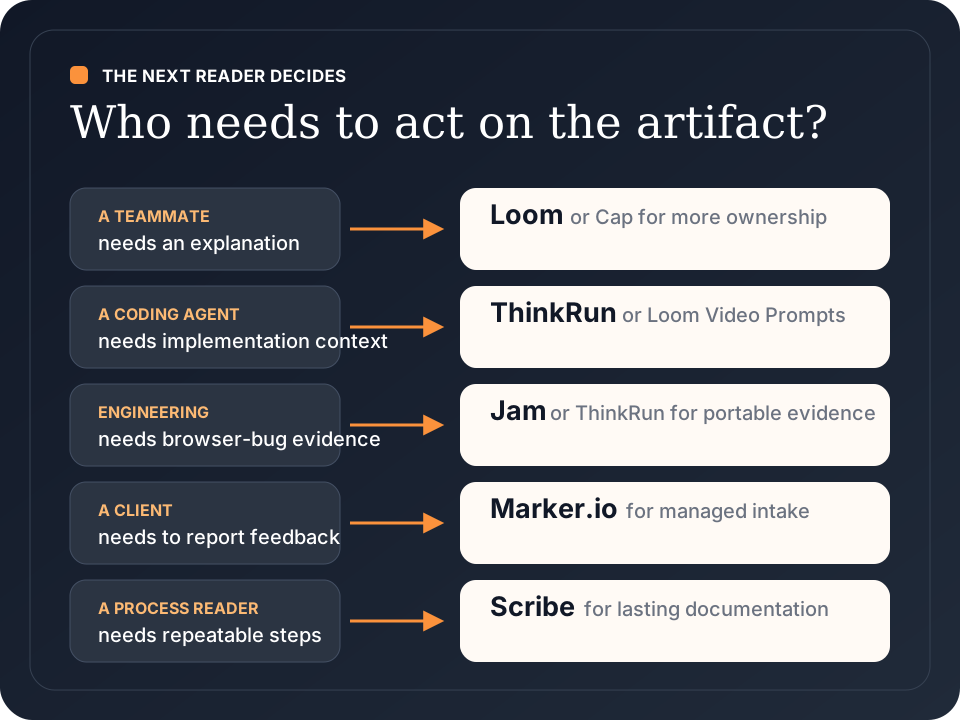
Then test the output, not the recorder. Give each tool the same two-minute scenario and ask:
- Can the receiver find the exact moment and element without watching the whole video?
- Are console, network, environment, and interaction details captured when the task needs them?
- Can an agent consume the result directly, or does a person have to rewrite it?
- Can sensitive data be reviewed, filtered, or kept local before sharing?
- Does the artifact work in the issue tracker and coding agent the team already uses?
That test will tell you more than a feature checklist.
If the problem is easy to reproduce live, a recorder may not be the right first tool. Compare Playwright MCP alternatives and Chrome DevTools MCP alternatives before adding a recording handoff to the workflow.
The bottom line
Loom's Video Prompts are a meaningful product shift. The demo gets the central idea right: when the next reader is an AI agent, a raw video is not enough. The recording needs to become a structured plan with references to the screen and the speaker's intent.
But an action plan is only one kind of useful output.
- Loom is strongest when video communication and Atlassian workflows already organize the team.
- Jam is strongest when the job is an agent-ready browser bug report.
- Cap is strongest when the goal is an open-source, self-hostable Loom replacement.
- Marker.io is strongest for structured website feedback and UAT.
- Scribe is strongest for reusable process documentation.
- ThinkRun is strongest when the same evidence needs to move between the person who recorded it, the developer who reviews it, and the coding agent that acts on it.
The best Loom alternative is the one that produces the next person's input—not simply another video.
FAQ
What is the best Loom alternative for developers?
Jam is the most focused choice for a shared browser-bug intake workflow. ThinkRun is the better fit when the same evidence must travel as a replay, Markdown, or JSON between a developer and different coding agents. Keep Loom when the team already communicates in Loom and manages implementation in Jira.
Which Loom alternatives capture console and network evidence?
Loom Bug Report mode, ThinkRun browser recordings, Jam, and Marker.io can all include console and network context, but their plan requirements and handoff formats differ. Verify the current plan before adopting one, and test whether the evidence arrives in the issue tracker or agent your team actually uses.
Can Claude Code or Codex use a screen recording?
Not reliably as a raw video alone. Give the agent a transcript, timestamped observations, screenshots with descriptions, and relevant console or network evidence. ThinkRun exposes those as Markdown and JSON; Jam exposes its evidence through MCP.
Is Jam or Loom better for bug reports?
Jam is the more focused browser-bug reporting system, with debugging evidence and MCP access available from its free entry plan. Loom is stronger when bug reports are one part of a broader async-video and Jira workflow.
What is the best open-source Loom alternative?
Cap is the clearest open-source option in this comparison. It supports local recording and self-hosting, while paid tiers add commercial usage, AI outputs, cloud collaboration, custom storage, and custom domains.